The exam hall runs on the students’ own laptops.
A professor writes the exam on batas.org. Students download it days early — sealed, and unreadable until the unlock code is announced in the room. Then each laptop locks down into an exam machine: other software is closed and kept closed, and nothing is on the screen but the paper. The answers travel back encrypted, with a receipt.
Get verified as an examiner Open the ExamCenter Get the app
- The whole computer locks for the exam
- Sealed until the room says open
- Answers encrypted end to end
- Ten exams a month, free
For students
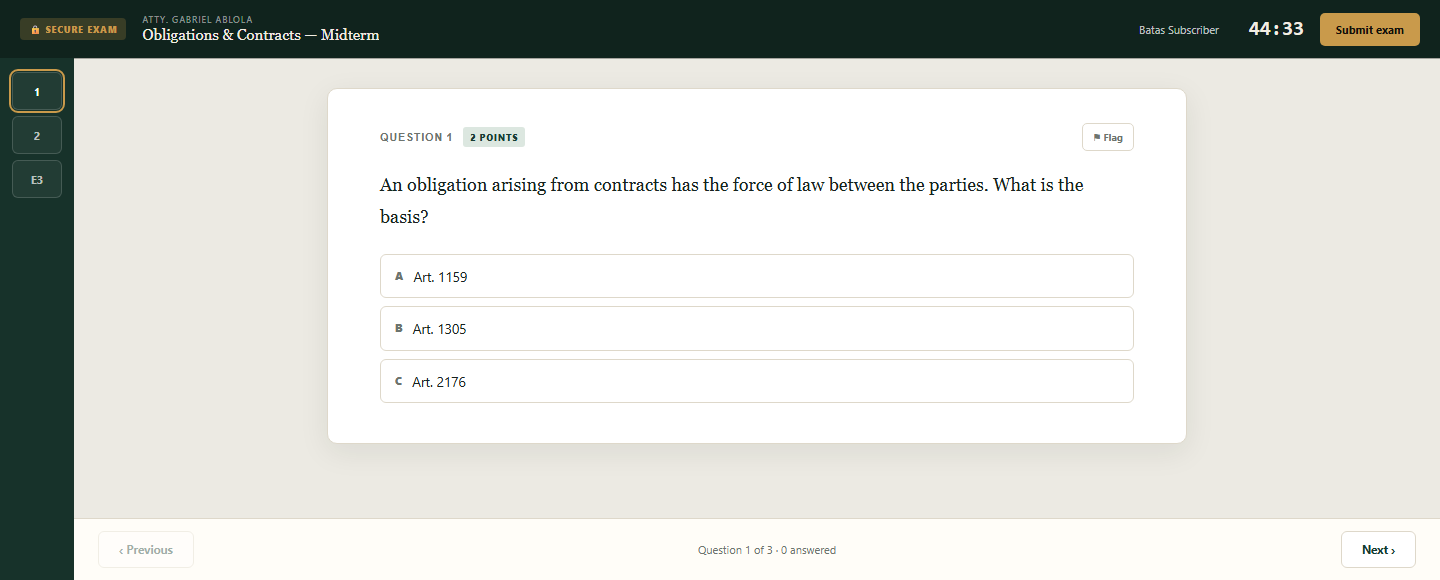
An exam that cannot be lost. It is on your computer before exam day, it opens with nothing but the unlock code, and every keystroke is saved as you type. A brownout costs you nothing.
A free Batas.org account and the app — no subscription.
For professors
Write it once and run it anywhere: multiple choice and essays, a window, a duration, two codes. Approve who may sit it, watch the answers arrive, release the results when you are ready.
Ten exams a month, free, once you are verified.
For schools and review centres
No per-seat exam licence, no camera in a student’s bedroom, no invigilation software to deploy. Your students already have the app; your professors verify their identity once.
Runs on the laptops your students already own.
From the paper to the released mark
On the laptop before exam day
Students enter the download code their professor gave the class, and the whole exam travels to their machine. Nothing has to be fetched on exam morning — no queue at the campus wifi, nobody locked out because the signal dropped. What arrives early is ciphertext: the questions cannot be read, by anyone, until the unlock code is spoken in the room.
Nothing is a surprise on the day
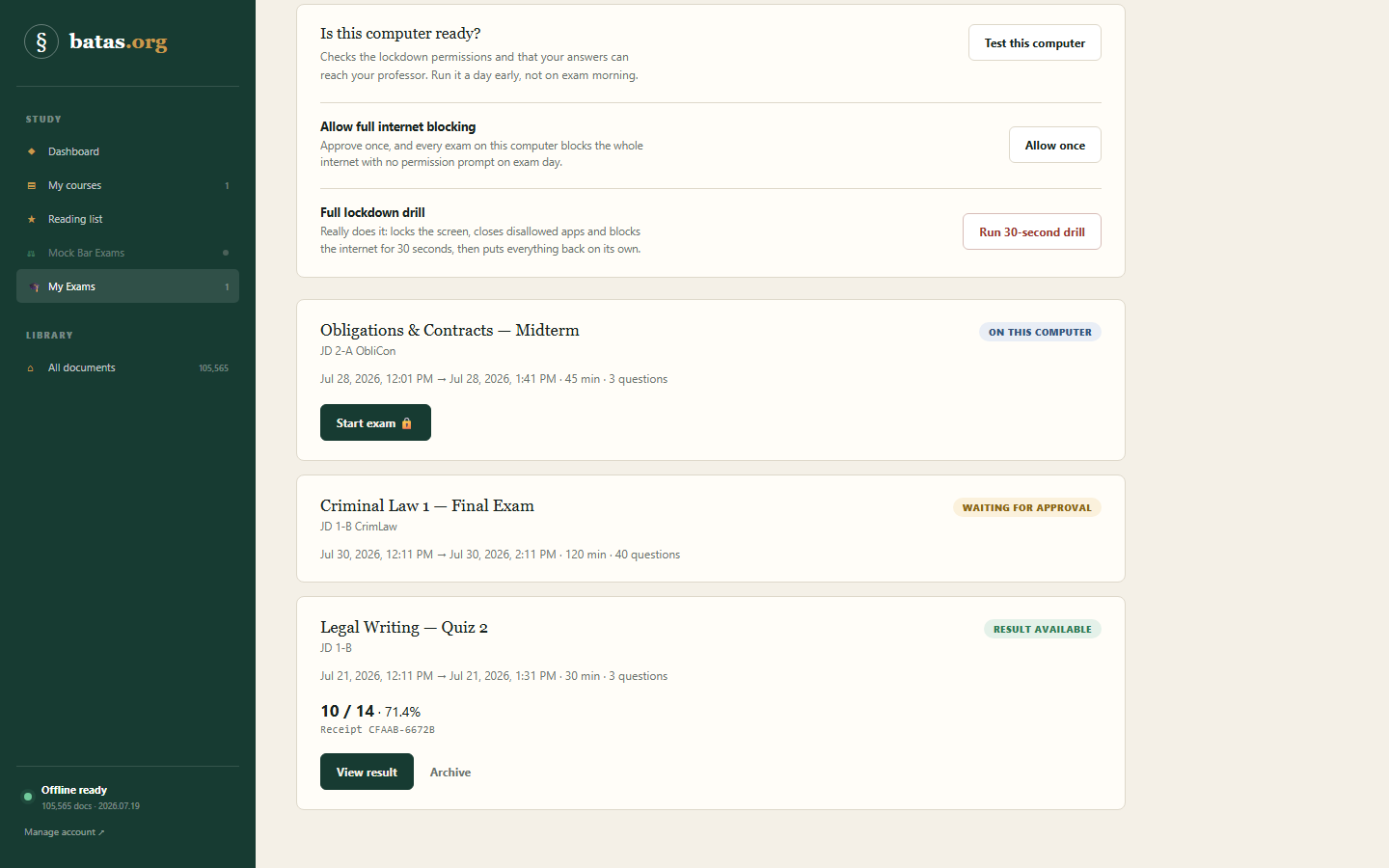
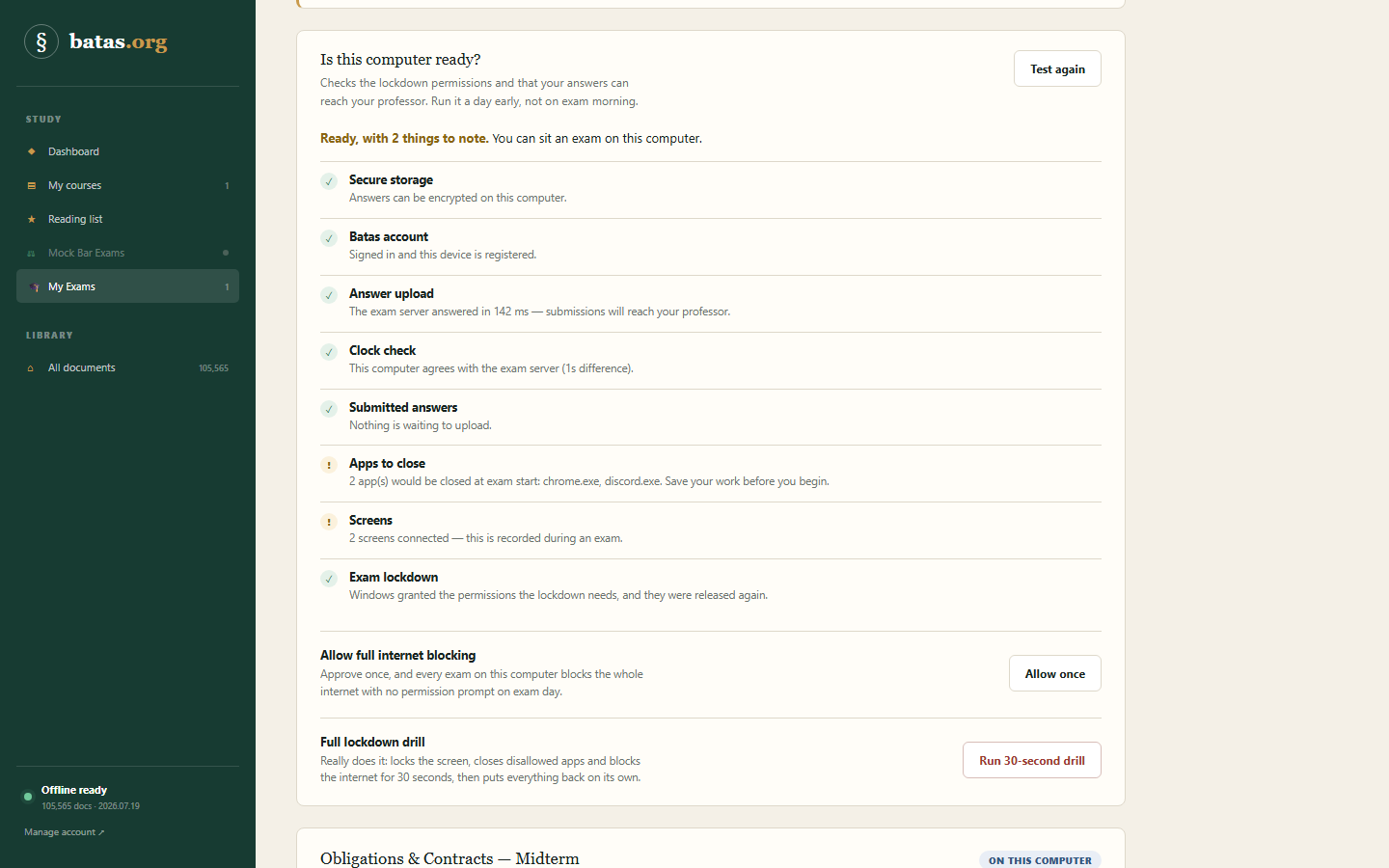
“Test this computer” checks the things that actually go wrong: whether answers can encrypt on this machine, whether they can reach the professor, whether the clock agrees with the exam server, which apps will be closed, how many screens are plugged in. There is a thirty-second drill that really does lock the computer and put it back, and a ten-minute practice exam under identical conditions.
Every keystroke is already saved
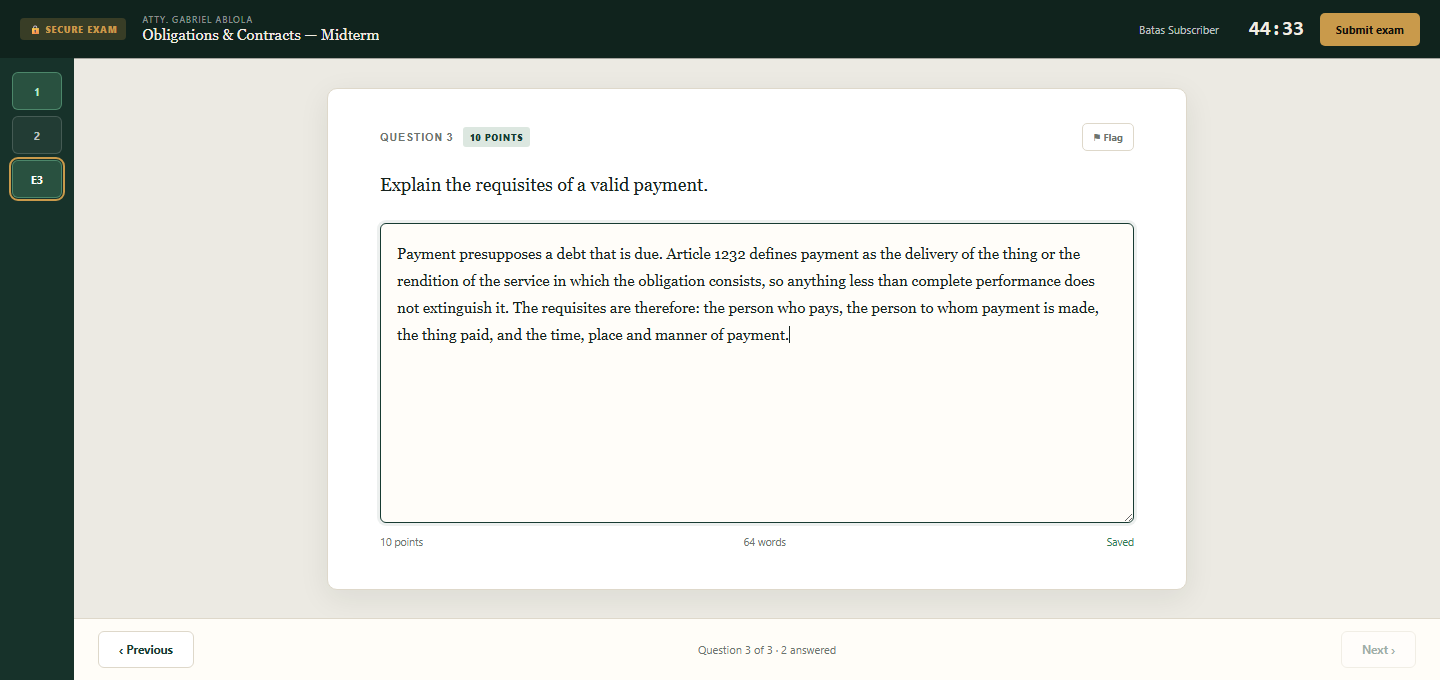
Answers are written to the disk encrypted as they are typed. A crash, a dead battery or a power cut costs nothing — the exam reopens with the unlock code and the clock the schedule set, not the one on the computer. If the network is down at submission time the answers wait, sealed, and upload themselves on the next connection. The student keeps a receipt either way.
Two codes, and you are running an exam
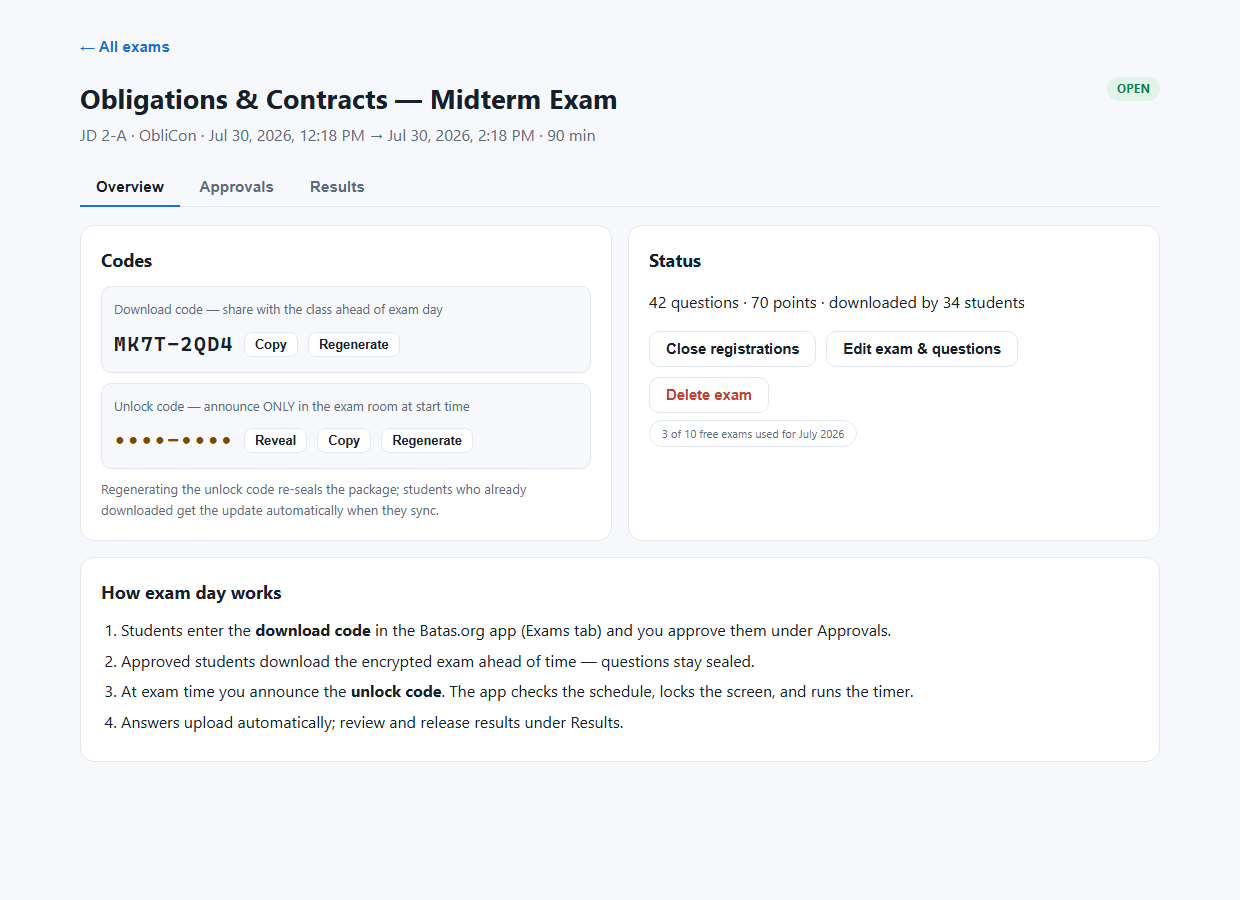
Professors write the paper in the ExamCenter on batas.org — items and essays, points, a window and a duration. A bank of questions from past Bar examinations sits one click away, ready to import with suggested answers attached. Publishing opens registration: a download code goes to the class, and you approve them one at a time or all at once. The unlock code stays yours until you say it out loud. Regenerate it and the package re-seals itself; students who already downloaded pick the change up on their next sync.
Grade it blind, question by question
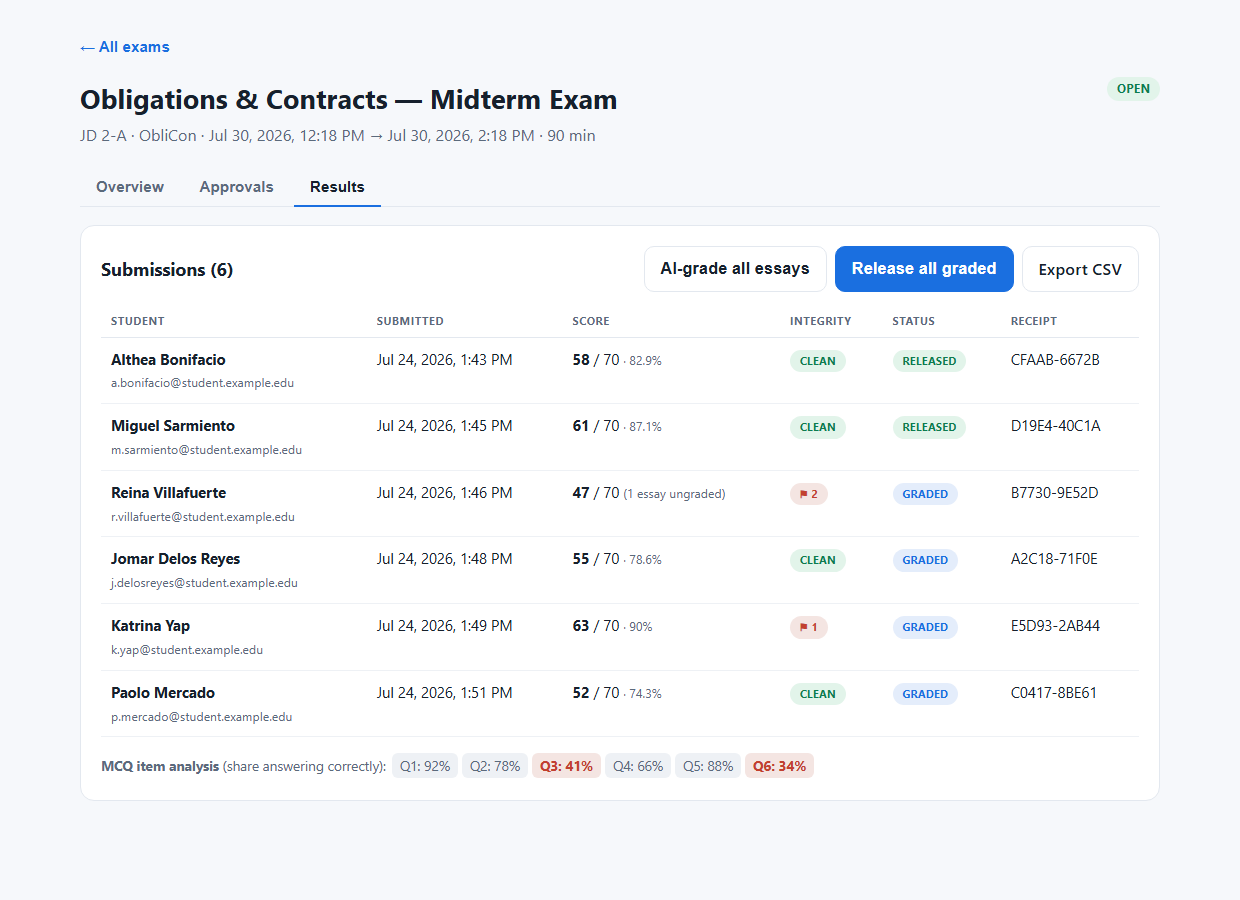
Submissions arrive with the multiple choice already scored and the essays waiting for you, each against a named receipt. Mark one essay across the whole class at once, with names hidden and the scripts shuffled, so the marking is genuinely blind. Item analysis shows which question the class actually failed, and integrity events are counted beside every attempt. Nothing reaches a student until you release it.
The student sees exactly what you released
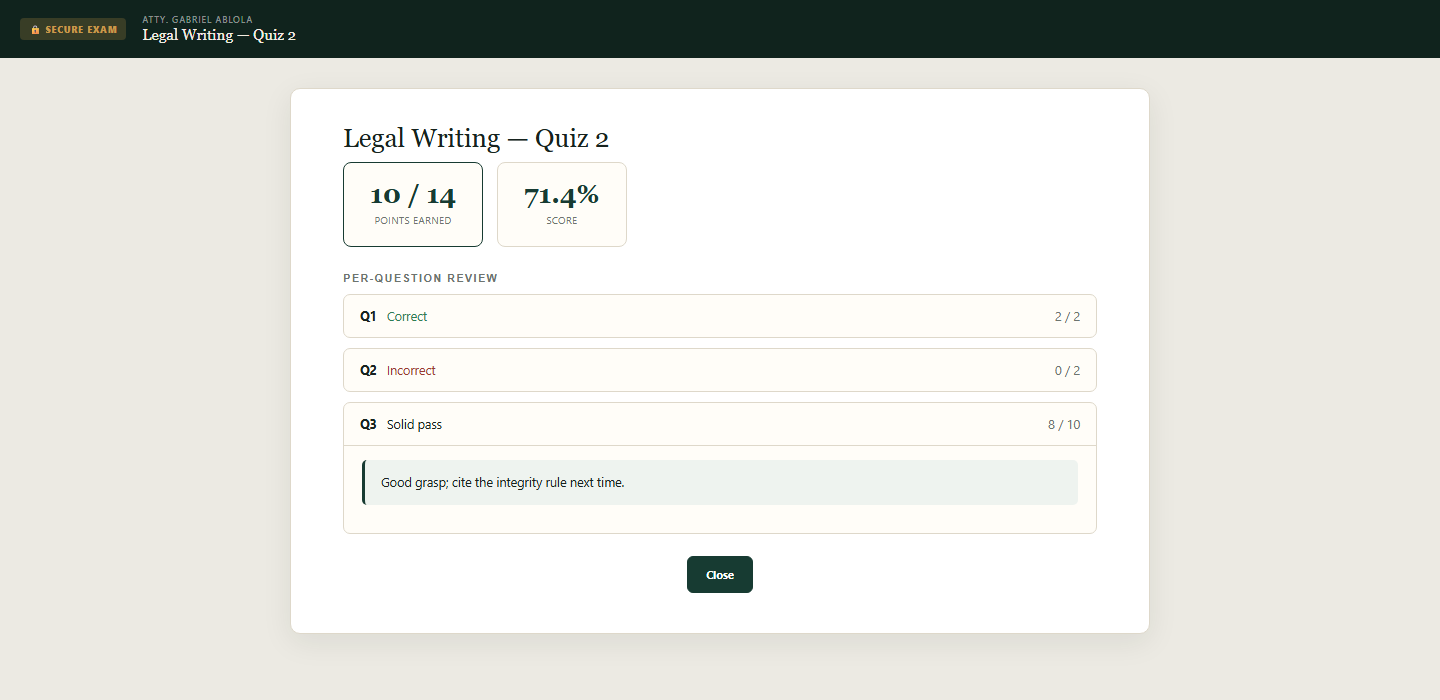
A released paper opens in the same app: points earned, the score, and a per-question review — right or wrong, the marks, and whatever you wrote on the essay. Their exam history also lives on their batas.org dashboard. The answer key itself never leaves the server, so releasing a result never hands next year’s class the paper.
How exam day works
- The class registers You share a download code. Students enter it in the app and you approve them.
- The exam travels early Approved students download a sealed package days ahead. The questions stay encrypted.
- You announce the code Only then does the package open. The app checks the schedule, locks the machine, starts the clock.
- Answers come home Submission ends the lockdown and uploads the paper — or queues it until there is a connection.
Security
Sealed until the room says open.
Exam security is mostly decided before anyone sits down. Here is what protects the paper, the sitting, and the answers — stated precisely, so your IT office can check it rather than take our word.
The paper travels sealed
A downloaded exam is ciphertext — AES-256-GCM, the standard governments use for classified material. The key that opens it is derived from the unlock code the professor announces in the room, hardened against brute force by two hundred thousand rounds of key stretching. Holding the file for weeks brings a student no closer to the questions.
The schedule cannot be doctored
The exam window, the duration and a fingerprint of the paper are cryptographically signed by the server, and the app verifies the signature before it decrypts anything. Editing the package to move the window or swap a question just produces a file the app refuses to open.
No answer key on the laptop
The sealed package carries questions, points and options — never the correct answers and never the rubric. Scoring happens on the server after submission. Even a hypothetically cracked package would yield the questions, not the key.
The clock is not the student’s
The app keeps its own offset against the exam server’s clock, captured every time it syncs. Winding the computer’s clock back does not reopen a closed window, and an exam that expires while the laptop is off finalizes at its true deadline.
Answers are encrypted twice
On the laptop, every answer is written to disk encrypted as it is typed. On the server, submissions are sealed again at rest — a stolen database dump reveals nothing. Every submission carries a named receipt the student keeps.
A record, not just a lock
Leaving the exam window, a second screen appearing, sleep, a restart, an app trying to relaunch — each is logged with a timestamp and shown beside the attempt in the ExamCenter. The professor sees a clean run as one quiet chip, and anything else as evidence.
What the lockdown actually does
- Closes other applications — and closes them again if they come back
- Switches off the taskbar and the Start menu for the duration
- Holds the exam full screen and in front, with app-switching shortcuts blocked
- Blocks copying, screenshots and screen sharing of the exam window
- Refuses a second copy of the app, and seals the built-in law library for the duration
- Puts everything back on submission — and after a crash, at the next launch
Lockdown is Windows for now; macOS is being brought back. And no exam program can see the phone in someone’s pocket — what this one does is make the laptop a poor place to cheat, and leave a record of every attempt to try.
Exam authoring is open to verified professors and reviewers. Verify once, and the ExamCenter unlocks on your account. Students only need the free app.
Get verified as an examiner Open the ExamCenter Get the app
Schools start the same way: verify one professor, run one exam, then scale it across the year level.